

The organisation's commitment register
Meetings have a calendar.Tasks have a list.Your organisation's commitments have nothing.
Kalends brings together all your organisation's important dates and recurring commitments, their purpose, who is responsible and whether they have been completed. Kalends reduces key-person risk by making it easy to transfer responsibility when people are away, change roles or leave.
Free company beta · personal support by email
Why Kalends exists
A missed commitment becomes visible only after it has cost something
Most of it goes fine anyway. But sooner or later somebody asks: what have we committed to, who owns it, and can we show that it was done? Three moments most organisations will recognise, and a single one of them costs more than Kalends does in a whole year.
The contract that renewed itself
The notice period in the framework agreement passed unnoticed and the organisation was locked in for another year. Nobody owned the watch date; everybody assumed somebody else did.
The person who kept it all in their head
The colleague who always kept things in order left, and with that went both the list and the knowledge of what was about to be missed. The routine lived with a person, not with the organisation.
The question nobody could answer
The auditor asked to see that the control was actually performed every quarter. It probably was, but nobody could show when, by whom or against what evidence.
What Kalends is
The system of record for everything your organisation must do repeatedly
Calendars keep track of people's time. To-do lists and boards drive their tasks. Both are personal tools: they follow the individual, not the organisation.
Kalends is the organisation's master for what must be done repeatedly: what needs to be done, why, who is responsible and how the organisation knows it was done. The same register can then be used in Kalends' list, calendar, timeline and year wheel views.
Sharing calendars and boards looks like a solution, but what is shared is still a personal tool. It shows no overall picture, not the need behind the work, not who owns the area, and it escalates nothing when something is about to be missed. Above all, it has no answer for the moment a person becomes unavailable. That level is what Kalends is for.
| Due | Commitment | Tag | Owner | Status |
|---|---|---|---|---|
| 31 Mar | VAT return | finance.tax | Anna S | Overdue |
| 31 Mar | Monthly close | finance | Johan L | Due |
| 02 Apr | Access review | compliance | Erik N | Scheduled |
| 05 Apr | Supplier contract, notice window | contracts | Johan L | Scheduled |
| 12 Apr | Board pack | board | Anna S | Done |
If the calendar invitation vanished, would the organisation still need to make sure this happened? If so, it belongs in Kalends.
Advanced rules for recurring dates
Align recurring work with operational reality, such as the last working day of the quarter, 90 days before a contract renews or the 12th of every month. Kalends knows the non-working days in each country and automatically adjusts the commitment's date when necessary.
Work continues when somebody is away
Illness and leave should not bring important commitments to a halt. The right stand-in receives what needs handling, while long-term ownership remains where it belongs.
Catch misses before they become problems
The people responsible get advance notice as a commitment approaches. If no one acts in time, the matter moves on according to your rules, before a missed deadline can cause costs or other consequences.
See whether responsibility works in practice
Track what is completed on time, what is delayed and where escalations recur. Trends become visible over time, with the history behind every metric.
What you can put into Kalends
A recurring process
- Closing the monthly accounts.
- Carrying out the annual follow-up of systematic work environment management.
A control step
- Reviewing access rights every quarter as part of internal control.
- Reviewing the procedure for NIS2 reporting.
An operational directive
- Maintaining sufficient liquidity.
- Ensuring reliable financial reporting.
A legal duty
- Filing the VAT return.
- Carrying out the annual equal pay survey.
A watch point
- Acting before a contract's notice period.
- Monitoring when an insurance policy needs to be renegotiated.
A time-bound obligation
- Renewing a permit in three years.
- Planning and completing an ISO recertification.
Three connected structures
Create a tactical plan you can track
Kalends organises recurring responsibility in three connected structures: tags, directives and commitments. Tags place responsibility in the organisation. Directives state what an area must uphold and why. Commitments turn it into recurring work that can be planned, assigned and followed up.
Department
Finance
Operational directive
Maintain sufficient liquidity
Tactical plan
Commitments- 1Approve the rolling cash forecastMonthly
- 2Review credit exposureWeekly
- 3Reassess funding needsQuarterly
- ✓Broad, explicit directives clarify the responsibility assigned to a department. The commitments beneath a directive form its tactical plan and can change without rewriting the assignment.
- ✓Directives are optional, but especially powerful when several commitments together uphold the same responsibility.
- ✓The built-in AI assistant can help formulate, name and create directives. Nothing changes until you review and approve the proposal.
Can you see, for every standing responsibility, the complete tactical plan meant to uphold it—and tell whether that plan is still sufficient?
People change. Tools change. Responsibilities remain.
Organisation and continuity
Build an organisation where responsibility always has a way forward
Mirror the organisation's hierarchy and place each standing directive where responsibility belongs. Connect commitments and people to the same structure, so it is always clear what an area must uphold, who is responsible and who takes over when something changes.
One shared map of responsibility
Create a digital twin of your organisation in Kalends — with departments, services and areas of responsibility. Every standing responsibility gets a clear home.
From standing intent to recurring work
Place directives at the right level and connect the commitments that keep them true in practice.
Continuity when people change
Assign owners, stand-ins and a responsibility chain. The work moves on while its context and history stay with the organisation.
Responsibility map
Standing directive
Ensure accurate tax reporting
Commitments that keep the directive true
Responsibility chain
Directly responsible
Anna
Stand-in
Johan
Area owner
Maria
Responsibility continues. Commitments, cadence and history remain when people change.
Presentation
Present year wheels straight from Kalends
Every organisation has its own cadences: board meetings, year-end closing, audits, contracts coming up for renewal, inspections that have to be walked. They are usually drawn by hand in a presentation, or in a separate tool with no automation and no connection to the business. In Kalends the wheel is drawn from the commitments themselves, with owners, dates and sign-offs behind every mark. Start presentation mode and the year fills the screen, without filters or menus, or export a clean image in your light or dark theme for the slides you still need.
Year wheel 2026
Compliance, contracts and finance
GDPR review
Louise Andersson · 12 February
Done
Supplier contract, renewal
Purchasing · 8 May
Overdue
Quarterly report Q2
Finance · 30 June
Due
Safety inspection, half-year
Production · 15 August
Scheduled
steps month by month
Compare with last year, month by month
Put last year's matching occurrences beside this year's, right in the wheel, and see which way it is going. Then step through the year a month at a time, with a panel listing that month's commitments and how many are done, overdue and remaining.
Save the design, use it as a dashboard widget
Year wheels are highly configurable. Filters and appearance are saved together as a wheel of its own. The same picture can be reopened in one action, or placed on the overview as a widget that keeps itself up to date.
See the whole organisation at once
Filter to a parent tag and see the combined rhythm of an entire area. Non-working days, where the load sits, where the gaps are, and who carries what.
Views
One register, several views
The same responsibility, seen from the angle the moment requires.
List
Filter, sort and group the register by owner, status, date, tag or directive. Save views for reviews you return to.
Calendar
Work with commitments by day, week, month or year. Create and move them in the calendar without losing ownership or history.
Timeline
See what is approaching on one time axis, from a week to a year. Each commitment gets its own lane.
Year wheel
See the year’s rhythm, peaks and gaps in an interactive wheel. Filter to one area and use presentation mode in management and board meetings.
Organisation
Build the organisation from tags, directives and commitments in one connected tree. Move directives to delegate responsibility and search the whole structure.
People
See each person’s commitments, responsibility route and current load. Manage absence, cover and handover from the same view.
History
Follow confirmations, evidence, comments, reminders, escalations and changes in the order they happened. An audit trail that cannot be rewritten.
Dashboard
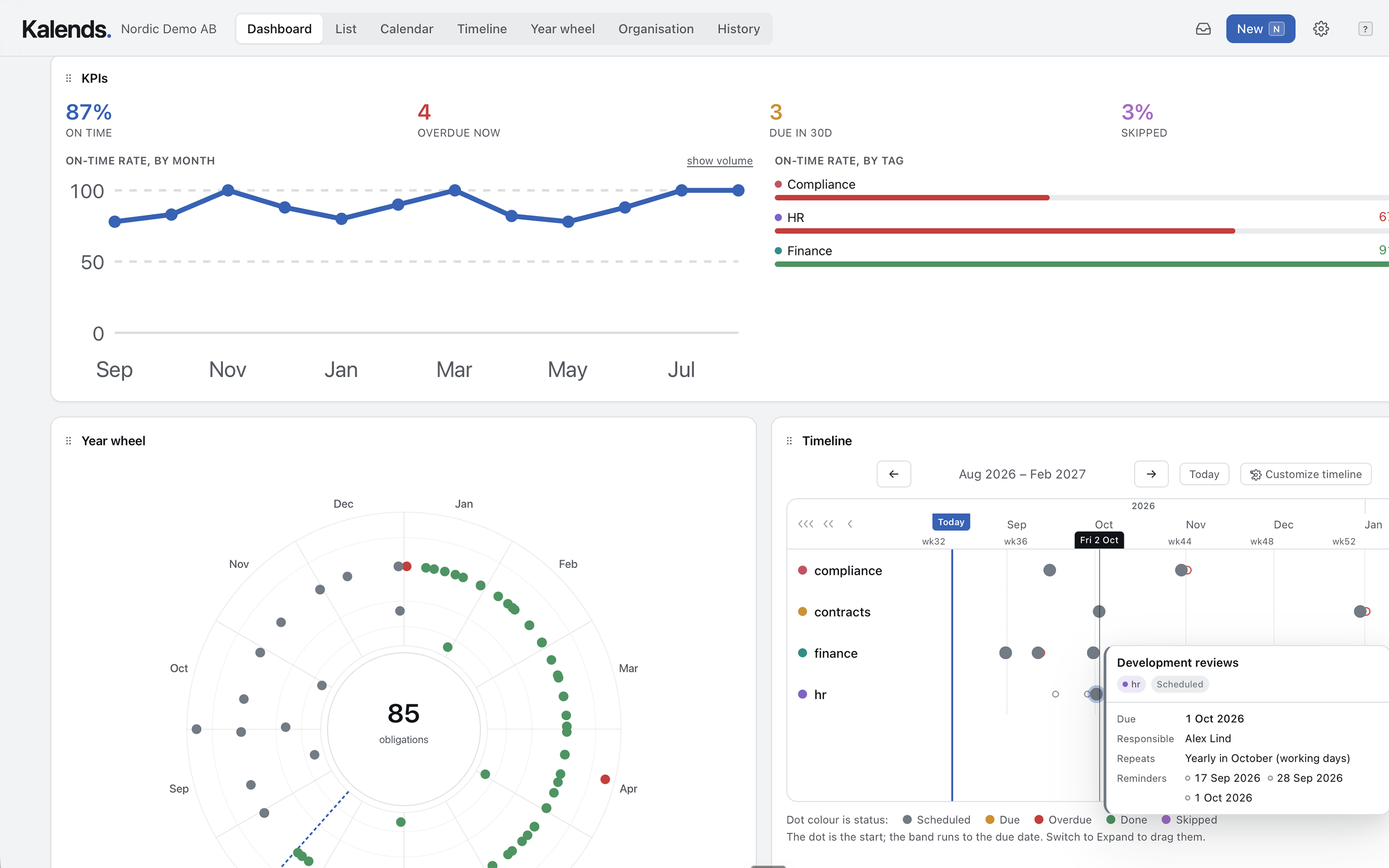
Build a personal overview with widgets for what needs attention. Combine year wheels, timelines and metrics on one page.
AI assistant
Ask questions across the register, find gaps and draft directives or commitments. The assistant changes nothing until you have reviewed and approved the proposal.
Kalends where the work happens
On your phone
Install Kalends as a mobile-friendly PWA. See notifications, handle what needs attention and use the AI assistant for more complex operations that would otherwise be awkward on a small screen.
In the calendar you already use
Subscribe to a personal ICS feed and choose exactly which commitments appear in your everyday calendar. Kalends retains the ownership, context and history; your calendar shows what you need in the flow of work.
Metrics and follow-up
See how the organisation actually performs
Kalends turns the execution of recurring commitments into measurable results. Follow the share completed on time, what is overdue, what falls due in the next 30 days and how performance develops over time. Compare areas and open any KPI to see the commitments and history behind the figure.
- Follow the trend month by month, not only today's position
- Compare areas and spot recurring delays or gaps
- Move from a KPI to the commitments, events and evidence behind it
92%
On time
4
Overdue now
17
Due in 30d
3%
Skipped
On time
92%
On time
On-time rate by month
On-time rate by area

Product images
See Kalends at work
Ten connected product moments from the same fictional organisation. Follow the same commitments from overview and planning to responsibility, execution and an audit trail.
1 / 10
What needs attention, in one place
Combine live KPIs, a year wheel and a timeline on a personal dashboard. Every figure remains connected to the commitments behind it.
Pricing
Choose the plan that fits your organisation
The price mainly follows how much responsibility you gather in Kalends. Every plan also covers the users, history and features the register needs to work day to day.
Start
For keeping track of the commitments you are responsible for yourself.
- Commitments
- 25
- People
- 3
- History kept
- 90 dagar
- Unlimited Operational Directives
- List, calendar, timeline and year wheel
- Saved views and shared dashboards
- Recurring rules, working-day shifts, Swedish holidays
- Sign-off with evidence and waivers
- Not included: Private commitments
- Not included: Access-controlled tags
- Not included: Automatic escalation
- Not included: Cover and closure periods
- Not included: AI chat with your own API key
- Not included: Guest accounts, single sign-on and API access
Team
For the organisation that has outgrown the point where one person can hold it all in their head.
billed annually · $948/year
- Commitments
- 250
- People
- 25
- History kept
- 1 years
- Everything in Start
- Private commitments
- Access-controlled tags for sensitive areas, including finance and HR
- Automatic escalation when a commitment is inactive
- Cover while somebody is away
- Closures and freeze windows
- AI chat with your own API key (BYOK): OpenAI, Anthropic or Google Gemini
- Not included: Guest accounts
- Not included: Single sign-on
- Not included: API access
Business
For a department inside a larger organisation, and for organisations that let auditors and consultants in.
billed annually · $2,988/year
- Commitments
- 1,500
- People
- 100
- History kept
- 3 years
- Everything in Team
- Guest accounts for consultants and auditors
- Single sign-on
- API access
Enterprise
For larger organisations with their own requirements for hosting, retention and support.
- Commitments
- Unlimited
- People
- Unlimited
- History kept
- Your policy
- Everything in Business
- Unlimited commitments and people
- Retention set to your own policy
- Support for agreed security and retention requirements
- Named support contact
Prices apply after the beta. You use Kalends free of charge during the beta period.
Private commitments are included from Team and do not count towards the organisation's limit.
Learn how to get started and find answers to common questionsHelp shape Kalends
Try Kalends with real commitments and help us prioritise how the product should work. You receive free access and personal support by email.